
Personalise your grant calculation
Available in Silver and Gold
Setle first estimates your grants without any personal details. Fill in your family situation and income on the Grants tab, and you get a more accurate amount.
What the Grants tab shows
The Grants tab is only active when a grant scheme applies to your renovation, for example Mijn VerbouwPremie. It shows:
- the grant provider’s explanation, with a link
- Your details: your family situation, your taxable income and the number of dependents
- an amount per measure and a total
Can’t open the tab? Then no grant scheme applies to this renovation.
Property in Brussels or Wallonia
For a property in Brussels, Setle shows no grant amounts. The Brussels Region has suspended the RENOLUTION grants. Since 1 January 2025, you can no longer apply for new grants for works with a final invoice dated 2025 or later.
The Grants tab explains this and links to the RENOLUTION website. You can’t fill in your details there, because there’s no amount to calculate.
For a property in Wallonia, read why Setle shows no grants there.
Fill in or change your details
Open your renovation.
Go to the Grants tab.
Choose the button to fill in your details:
- Calculate my grants on a computer, if you haven’t filled in anything yet
- Personalise on your phone, if you haven’t filled in anything yet
- Edit if you have already saved details
The Personalised grant calculation window opens. Fill in:
- Family situation: “Single” or “Cohabiting or married”
- Taxable income. Do you live together or are you married? Then the field is called Joint taxable income. You find the amount on your tax assessment notice.
- Number of dependents
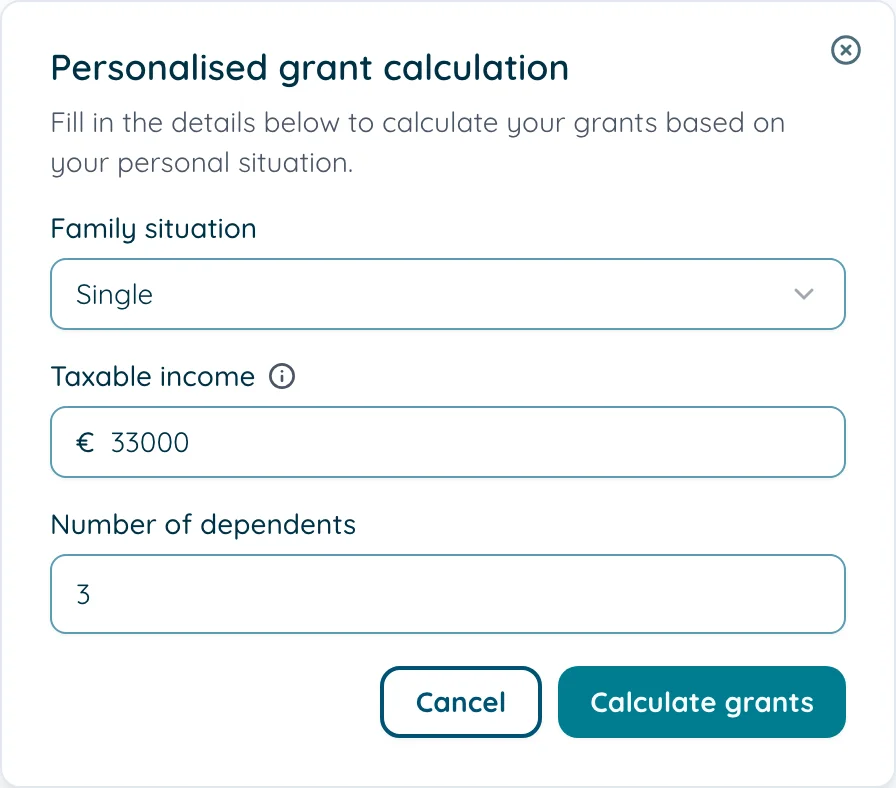
Choose Calculate grants. The window stays open until the calculation is ready.
On your phone, the window slides up from the bottom of the screen.
After the calculation
You see the message “Your grants have been recalculated based on your details.” The amounts per measure and the total are then updated. If your details don’t make you eligible for any grant, you see “No grants available”.
Good to know: even with your personal details, the amounts remain an estimate. The authority that awards the grant decides the final amount.